
Yearning: A Gay Story

More by Bob C Games

About Yearning: A Gay Story
Yearning: A Gay Story (YAGS for short) is a coming-out-focused character-driven slice-of-life visual novel with dating sim elements where you play as a gay man starting his freshman year of college at a generic university somewhere in the midwestern United States. You will interact with a cast of characters, each with their own personality and stories, as you navigate college life, develop friendships, play board games, and come out. With luck, you might even find a boyfriend.
Downloads
vFinalConfused about how the downloading works? Here is a handy guide
- Windows: Extract the downloaded ZIP file (with a program like WinZip, if necessary), and double-click on YAGS.exe to run.
- Mac: Extract the downloaded ZIP file and double-click on YAGS.app to run. If you get an error that the game is from an unknown developer, instead either ctrl-click or right-click on YAGS.app and choose "Open" from the menu.
- Linux: Extract the downloaded zipped tarball, and run YAGS.sh from a terminal to launch the game.
- Android: Download the APK directly to your phone or tablet and open the file from the file browser on the device. You may get a warning about installing from a source other than the Play store that you will have to accept. Some devices may block installs from APKs.
- If you want Uncensored version, check 'Uncensor Patch'
Walkthrough & Guide
Note: Uncensoring is only possible for Windows, Mac, and Linux installations.
Android installations cannot be uncensored at this time.
Extract the YAGS archive you downloaded.
Next, find the location where you extracted the game and navigate into the game directory. You should see something like this:
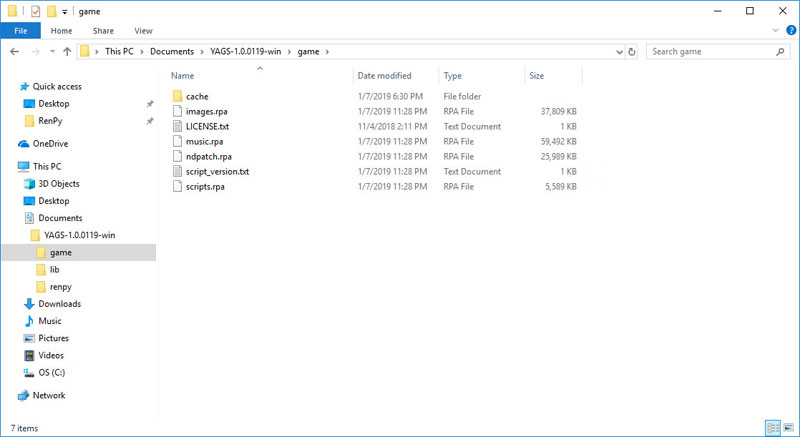
(On mac, right-click on the app and choose "Show Package Contents", then navigate into Contents\Resources\autorun\game.)
Download the YAGS-Uncensor-ndpatch -archive from one of the links above and exctract it.
Find the downloaded and extracted ndpatch.rps -file, and cut it. (Either right-click on it and choose "Cut", or highlight the file and hit Ctrl-X, or Command-X on a mac.).
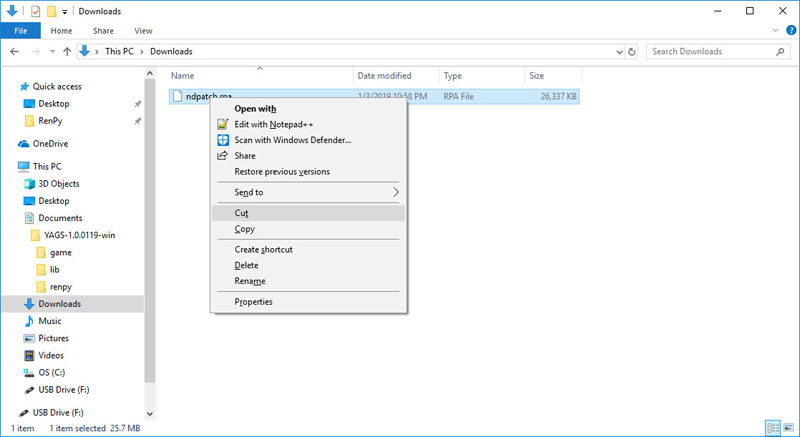
Navigate back to the game directory, and paste the file. (Either right-click in the folder and choose "Paste" or hit Ctrl-V, or Command-V on a mac.)
You should be prompted to replace the file:
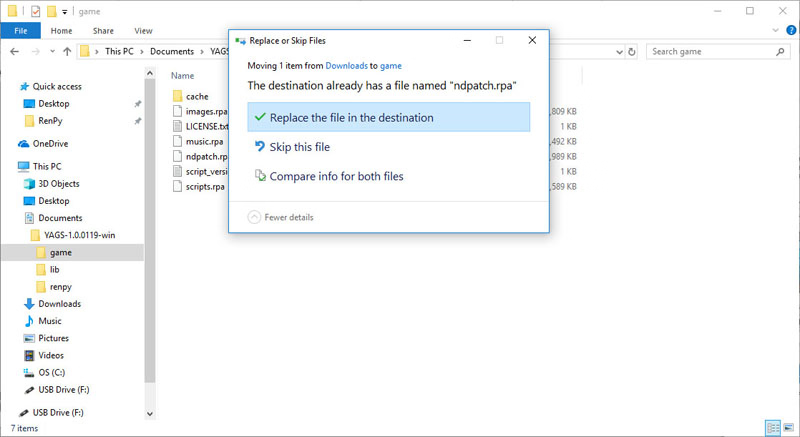
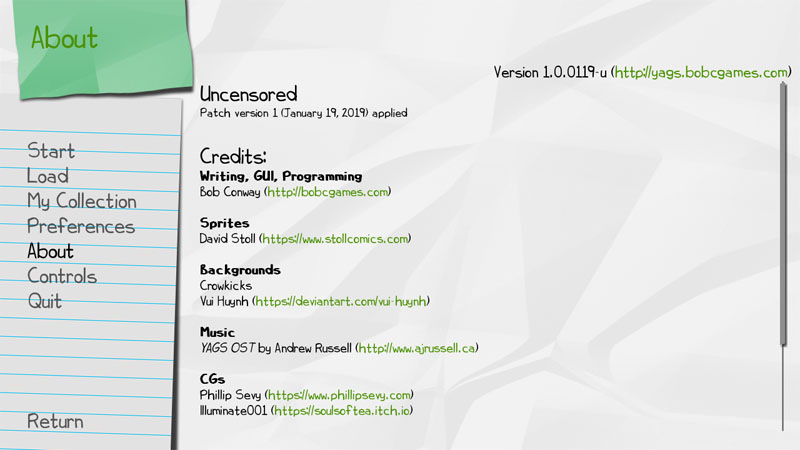
Replace the file and launch the game. The version of your game should now end in -u (for uncensored), and you should have patch information in the "About" screen.
Minimum
OS: Windows 7+ / macOS 10.10+ / Linux
CPU: Dual Core 1.5 GHz
RAM: 2 GB
GPU: Integrated Graphics
Storage: 149.3 MB
Recommended
OS: Windows 10+ / macOS 12+ / Linux
CPU: Dual Core 2.0 GHz
RAM: 4 GB
GPU: Any dedicated GPU
Storage: 149.3 MB
Wil you add the second installment and the third game to complete this trilogy?
Sorry not yet.