
Soft Buns
About Soft Buns
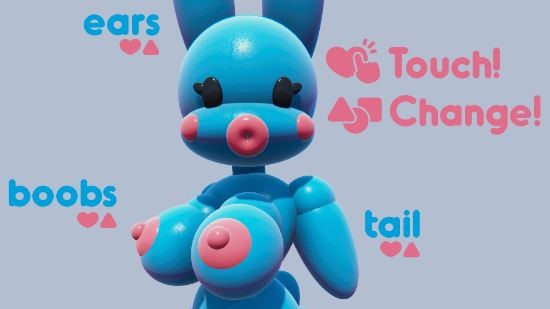
Soft Buns is a physics simulation toy made to satisfy that urge to just press and pull soft spheres around. These spheres squash, stretch, and bounce in a pretty realistic way to how you might expect. Not only that but I went ahead and built and reshaped the spheres to look like some kind of weirdo bunny doll thing who reacts to your interactions… It’s not something we should dwell on. Just enjoy it for what it is and maybe don’t go telling your friends and family what you’ve been up to.
The game also features fully customizable materials so you can choose the colors you want your spheres to be as well as the glossiness and other interesting qualities. On top of that, you can even switch out body parts to give the character a few different looks depending on your taste and how your happen to be feeling at the moment. And don’t worry, all of your tweaks to the character will automatically save so you will be greeted by the same character you left off with next time you open the game!
Downloads
vDemoConfused about how the downloading works? Here is a handy guide
- Extract the compressed file to a specific folder.
(If you get error in WinRAR, use DAEMON tool lite to mount the compressed file as a disk and then copy the game files from that virtual disk.) - Open the folder and run the .exe file to play.
Walkthrough & Guide
- LMB Hold - Rotates the camera while moving the mouse.
- MMB Hold - Adjust camera height while moving the mouse.
- MMB Scroll - Zoom in and out while scrolling up and down.
- RMB Press - Slaps interactable parts.
- RMB Hold - Grabs interactable parts and moves them with the mouse.
- Tab - Opens the Customize menu.
- M - Toggles mirror mode for mirrored interactions.
- Backspace - Resets customization to defaults (requires a game restart).
- Esc - Quits the game immediately.
Known Bugs:
- Opening the Customize menu while an interactable part is still moving will cause the part to default to that position. A game restart resets the position.
- Switching customizable parts too quickly can cause them to get stuck in weird positions. A game restart resets the positions.
- Sometimes when switching parts for the first time, a single frame will display bugged geometry across the screen.
Minimum
OS: Windows 7+
CPU: Dual Core 2.0 GHz
RAM: 4 GB
GPU: Integrated Graphics
Storage: 17.08 MB
Recommended
OS: Windows 10+
CPU: Quad Core 2.5 GHz
RAM: 8 GB
GPU: Any dedicated GPU
Storage: 17.08 MB
Pretty cool game, but there’s no vaginal sex.