
Finished
vFinal
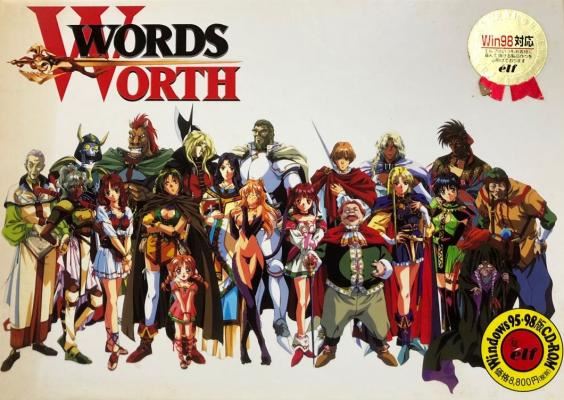
Words Worth
More by Elf
 YU-NO: The Girl that Chants Love at the Edge of the World
Finished
#15,859
1,838
4.1
YU-NO: The Girl that Chants Love at the Edge of the World
Finished
#15,859
1,838
4.1
 Scent of Seductive Flesh
Finished
#11,865
3,690
3.6
Scent of Seductive Flesh
Finished
#11,865
3,690
3.6
 The Patient of Maro is a Muscular Type
Finished
#11,329
3,980
3.8
The Patient of Maro is a Muscular Type
Finished
#11,329
3,980
3.8
 Doukyuusei: Bangin’ Summer
Finished
#7,555
13.9K
3.7
Doukyuusei: Bangin’ Summer
Finished
#7,555
13.9K
3.7
 Run Run Kyousoukyoku
Finished
#20,142
351
Run Run Kyousoukyoku
Finished
#20,142
351
 My girlfriend is a blue-collar worker
Finished
#6,378
8,804
4.0
My girlfriend is a blue-collar worker
Finished
#6,378
8,804
4.0
 FOXY
Finished
#19,188
676
3.3
FOXY
Finished
#19,188
676
3.3
2DCG
Adventure
BDSM
Censored
Combat
Fantasy
Harem
Japanese Game
Male Protagonist
Multiple Endings
Rape
Romance
RPG
Vaginal Sex
Visual Novel
Voyeurism
About Words Worth
God created Light and Shadow and separated them with the power of the divine Words Worth Tablet. One day, the Words Worth Tablet shall be read and all will be understood, and Light and Shadow will join and become complete. But someone has shattered the Tablet. The Tribe of Light and the Tribe of Shadow each blame the other and war ensues for 100 years. The story revolves around the bumbling but very skilled Prince Astral of the Tribe of Shadow who may be the one to bring the Tribes together and restore peace.
Downloads
vFinalConfused about how the downloading works? Here is a handy guide
Copyright and Terms: Lewdzone is a crawling site. We post games like Words Worth from trusted sources like Patreon official release, creator's official site and F95. We only share links of files provided by those sources. We do not include/exclude anything to/from the packages. We do not host those files and those files are hosted in public file sharing servers and by the ToS of those servers, it is legal to share any public files.
- Important:
- You need to change system locale to Japanese before installing the game.
- Mount the .mds image file with a virtual drive software
- Start installation by clicking on Words Worth logo, top of the menu. The big letters button under the Words Worth logo is for installing a bonus mini game(not translated).
- Installation:<br>Choose 1.17GB installation, then next (bottom right button).<br>Choose Indeovideo, then next (bottom right button).<br>You can choose directory in the third screen with the button on the top.<br>The button between back and next is for exit the installation.<br>In the last screen click on the button above the exit button and wait.
- Copy all files from folder English Patch and Fix in the game directory(C: program files/WWXP).
- Right click on “ww_english.exe” and set compatibility mode to win98 or winXP to avoid some crashes and watch the opening video.
- Start the game from ww_english.exe.
- IF the background of the main menu doesn’t say words worth and is a silhouette of a guy smoking, you installed the wrong version, which means the game will be textless if you try to play.
- If you play the game for the first time you can’t skip the opening video, if not, you can skip it with the right mouse button.
- “The game will probably crash if you try to use your bow or trigger certain events, to fix this, go the the game config menu and click the video card with the X over it (or click right below it you should be able to tell how the option is chosen) It will probably cause some of the game to be a bit jerky (especially the last boss for for me, I didn’t try seeing if I could
- fight him with it enabled though).”
- Tested on Windows 7 and working.
Minimum
OS: Windows 7+
CPU: Dual Core 2.0 GHz
RAM: 4 GB
GPU: Integrated Graphics
Storage: 1.38 GB
Recommended
OS: Windows 10+
CPU: Quad Core 2.5 GHz
RAM: 8 GB
GPU: Any dedicated GPU
Storage: 1.38 GB