
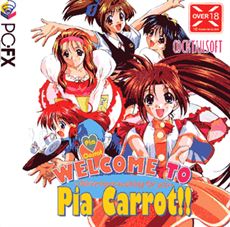
Welcome to Pia Carrot!!
About Welcome to Pia Carrot!!
You play as Yusuke, a young 18-year-old just finished with High School. You plan on spending your last summer with your best friend Daisuke. However, previously you made a bet with your father, concerning your grades. Your test marks are not desirable, and you lose the bet, therefore you must live up to your promise and work at daddy’s restaurant, the Pia Carrot. What seems like what’s going to be a lame summer of slave labor, becomes the greatest and most memorable summer of your life. What makes things interesting are all the cute girls who work at the Pia Carrot, and those who dine there.
You already know Shouko, a childhood friend of yours and Satomi, a classmate and the girl you have a crush on already, will be working with you. Yet, as the summer goes by the interaction with other girls is intense and you must choose who you want. There are a total of nine girls Satomi, Shouko, Reika, Yukiko, Saori, Airi, Shiho, Kiyomi, and Yukari, to court after.
Some will be easy to win over, others will require much sacrifices, patience, gentleness, perseverance, and chivalry. Your goal is to have one of the ladies “fall head over heels” for you and have her meet you in the park August 28th after you call her.
This is a PC-FX console game so an emulator is necessary to run the game. Please read the installation steps.
Downloads
vFinalConfused about how the downloading works? Here is a handy guide
- Download and install <a href="http://retroarch.com/?page=platforms" target="_blank" rel="nofollow noopener">RetroArch</a>. RetroArch is one of the recommended emulators for PC-FX.
- Place pcfx.rom into the "system" in your Retroarch directory. The default installation directory should be "C:\Users\USERNAME\AppData\Roaming\RetroArch\system".
- Run RetroArch and download NEC - PC-FX core.
- Load the installed core.
- Load the downloaded content (CUE file of the game).
Walkthrough & Guide
Minimum
OS: Windows 7+
CPU: Dual Core 2.0 GHz
RAM: 4 GB
GPU: Integrated Graphics
Storage: 482.7 MB
Recommended
OS: Windows 10+
CPU: Quad Core 2.5 GHz
RAM: 8 GB
GPU: Any dedicated GPU
Storage: 482.7 MB