
Ongoing
v5.8
Double Perception
More by Zett
3DCG
Adventure
Animated
Big Ass
Big Tits
Combat
Handjob
Harem
Incest
Male Protagonist
MILF
Monster Girl
Oral Sex
Rape
RPG
Sandbox
Sleep Sex
Titfuck
Turn Based Combat
Vaginal Sex
About Double Perception
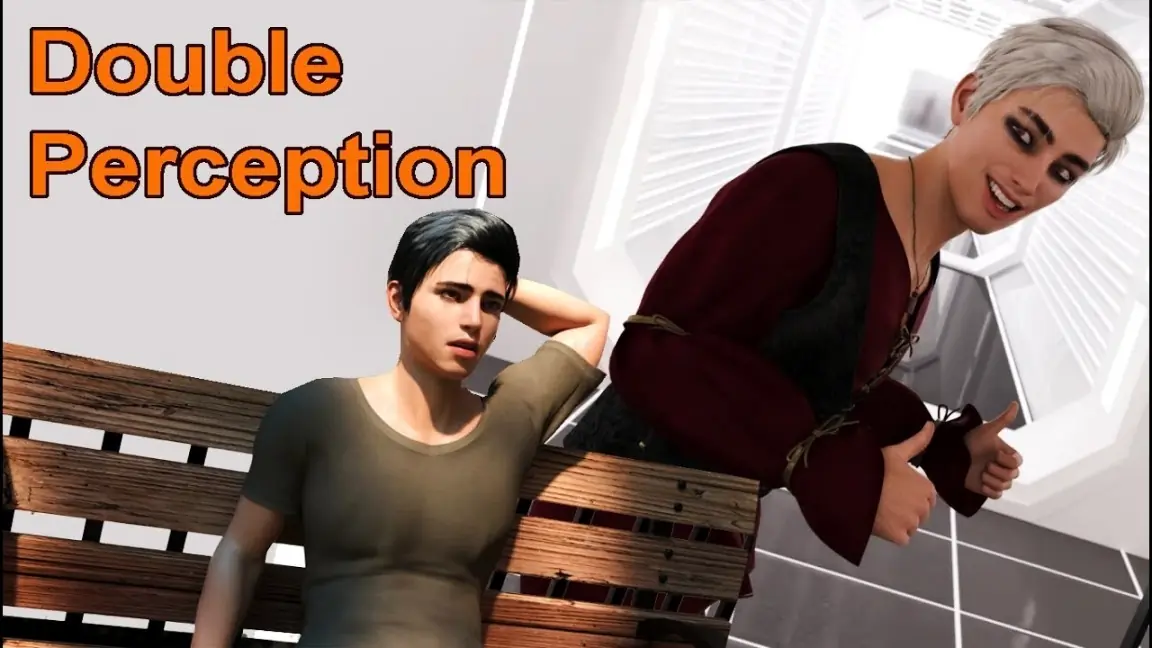
Double Perception” is a game with 2 realms. First is Reality. Nothing special, just common Earth. Second is a bit more interesting – Dawn of Arcanum. DoA is a VR game, that you can access via VR headset in your room. (But you have to buy it first.) Explore both worlds for opportunities, meet new people and earn a reputation of a titled player.
Downloads
Confused about how the downloading works? Here is a handy guide
Windows
Fileknot Transfaze Fileknot (Incest Patch) Transfaze (Incest Patch)
Mac OS
Fileknot Transfaze Fileknot (Incest Patch) Transfaze (Incest Patch)
Linux
Fileknot Transfaze Fileknot (Incest Patch) Transfaze (Incest Patch)
Windows
Buzzheavier Datanodes Mega Pixeldrain Vikingfile Fileknot (Incest Patch) Transfaze (Incest Patch)
Mac OS
Buzzheavier Datanodes Mega Pixeldrain Vikingfile Fileknot (Incest Patch) Transfaze (Incest Patch)
Linux
Buzzheavier Datanodes Mega Pixeldrain Vikingfile Fileknot (Incest Patch) Transfaze (Incest Patch)
Copyright and Terms: Lewdzone is a crawling site. We post games like Double Perception from trusted sources like Patreon official release, creator's official site and F95. We only share links of files provided by those sources. We do not include/exclude anything to/from the packages. We do not host those files and those files are hosted in public file sharing servers and by the ToS of those servers, it is legal to share any public files.
- Extract and run.
- Incest Patch Installation PC: Unzip to the "game" folder.
Walkthrough & Guide
Walkthrough & Tips: FILEKNOT - ANONZIP
Cheats Installation:
- Simply save the zCodes.rpy file in the "game" directory
- Start the game or restart if it was running
- Now you can use these codes below:
gallery = Unlocks the Gallery

itemsvr = Adds items to the DoA (VR Game) inventory

itemsrl = Adds items to the "RL" inventory

vron = Enables VR

mikadoll = Mika - Doll

ragdoll = Ragdoll - Doll
Unmodified codes:
Gallery: k9u2Nc

Items VR/DoA: mS8k2c

Items Reality: Rl1tMs

Enable VR: H4lm49

Mika - Doll: D8lMk4

Ragdoll - Doll: 9g5L28
5.8
Feb 18, 2026
- New Animated Scene – Rachel at the balcony – HJ
- New Interaction – Invite Riley to the Restaurant
- New Animated Scene – Riley Restaurant – SEX
- New Animated Scene – Alice SPA – BJ
- New Animated Scene – Cassie Cinema– SEX
- New Animated Scene – Kim & Jennie – MC’s room Threesome
Minimum
OS: Windows 7+ / macOS 10.10+ / Linux
CPU: Dual Core 1.5 GHz
RAM: 2 GB
GPU: Integrated Graphics
Storage: 6.92 GB
Recommended
OS: Windows 10+ / macOS 12+ / Linux
CPU: Dual Core 2.0 GHz
RAM: 4 GB
GPU: Any dedicated GPU
Storage: 6.92 GB
I see “rape” in the tags, is it avoidable?
yes
Its sandbox with possibility of rape:
Sleep sex. And drug the girl and rape. Or not.
Game have normal sex scenes already. Then no reason to “rape” if you are not interesed.
How can i use code
Look at the cheat installation.
Need special cheat codes for 5.1 please
Weird.
The cheat should bypass the codes and replace with the new codes listed under the cheat.
Unless you did not install the cheat linked above then your sol
Can someone explain to me how the ipatch works if I download it and add it to the game does that mean incest is on or does that mean that incest gets turned off? And is that the same way for every single game that it’s in IN general?
After you extract ipatch and then add it to the game folder…incest gets turned on
I'm sorry, but an uncaught exception occurred.While loading <'Image' u'guardians/lydia/Service Upgrade 1.png'>:
File "game/script.rpy", line 33, in script call
""
File "game/script.rpy", line 33, in script call
""
File "game/script.rpy", line 33, in script call
""
File "game/script.rpy", line 33, in script call
""
File "game/script.rpy", line 33, in script call
""
File "game/script.rpy", line 33, in script call
""
File "game/script.rpy", line 33, in script call
""
File "game/script.rpy", line 33, in script call
""
File "game/script.rpy", line 33, in script call
""
File "game/script.rpy", line 33, in script call
""
File "game/script.rpy", line 33, in script call
""
File "game/Overworld Screens/!Rachel/VR events.rpy", line 55, in script call
call interaction_end(ap)
File "game/script.rpy", line 33, in script call
""
File "game/script.rpy", line 33, in script call
""
File "game/Overworld Screens/!Rachel/Invite/ClothingStore.rpy", line 194, in script call
call interaction_end(ap)
File "game/script.rpy", line 33, in script call
""
File "game/MC/Events/Sleep.rpy", line 21, in script call
call interaction_end(0)
File "game/Overworld Screens/!Kim/VR Events.rpy", line 580, in script call
call interaction_end(ap)
File "game/script.rpy", line 33, in script call
""
File "game/script.rpy", line 33, in script
""
IOError: Couldn't find file 'guardians/lydia/Service Upgrade 1.png'.
-- Full Traceback ------------------------------------------------------------
Full traceback:
File "game/script.rpy", line 33, in script call
""
File "game/script.rpy", line 33, in script call
""
File "game/script.rpy", line 33, in script call
""
File "game/script.rpy", line 33, in script call
""
File "game/script.rpy", line 33, in script call
""
File "game/script.rpy", line 33, in script call
""
File "game/script.rpy", line 33, in script call
""
File "game/script.rpy", line 33, in script call
""
File "game/script.rpy", line 33, in script call
""
File "game/script.rpy", line 33, in script call
""
File "game/script.rpy", line 33, in script call
""
File "game/Overworld Screens/!Rachel/VR events.rpy", line 55, in script call
call interaction_end(ap)
File "game/script.rpy", line 33, in script call
""
File "game/script.rpy", line 33, in script call
""
File "game/Overworld Screens/!Rachel/Invite/ClothingStore.rpy", line 194, in script call
call interaction_end(ap)
File "game/script.rpy", line 33, in script call
""
File "game/MC/Events/Sleep.rpy", line 21, in script call
call interaction_end(0)
File "game/Overworld Screens/!Kim/VR Events.rpy", line 580, in script call
call interaction_end(ap)
File "game/script.rpy", line 33, in script call
""
File "game/script.rpy", line 33, in script
""
File "renpy/ast.py", line 721, in execute
renpy.exports.say(who, what, *args, **kwargs)
File "renpy/exports.py", line 1417, in say
who(what, *args, **kwargs)
File "renpy/character.py", line 1237, in __call__
self.do_display(who, what, cb_args=self.cb_args, dtt=dtt, **display_args)
File "renpy/character.py", line 889, in do_display
**display_args)
File "renpy/character.py", line 635, in display_say
rv = renpy.ui.interact(mouse='say', type=type, roll_forward=roll_forward)
File "renpy/ui.py", line 298, in interact
rv = renpy.game.interface.interact(roll_forward=roll_forward, **kwargs)
File "renpy/display/core.py", line 3315, in interact
repeat, rv = self.interact_core(preloads=preloads, trans_pause=trans_pause, pause=pause, pause_start=pause_start, **kwargs)
File "renpy/display/core.py", line 3834, in interact_core
self.draw_screen(root_widget, fullscreen_video, (not fullscreen_video) or video_frame_drawn)
File "renpy/display/core.py", line 2555, in draw_screen
renpy.config.screen_height,
File "render.pyx", line 492, in renpy.display.render.render_screen
File "render.pyx", line 263, in renpy.display.render.render
File "renpy/display/layout.py", line 824, in render
surf = render(child, width, height, cst, cat)
File "render.pyx", line 170, in renpy.display.render.render
File "render.pyx", line 263, in renpy.display.render.render
File "renpy/display/layout.py", line 824, in render
surf = render(child, width, height, cst, cat)
File "render.pyx", line 170, in renpy.display.render.render
File "render.pyx", line 263, in renpy.display.render.render
File "renpy/display/layout.py", line 824, in render
surf = render(child, width, height, cst, cat)
File "render.pyx", line 170, in renpy.display.render.render
File "render.pyx", line 263, in renpy.display.render.render
File "renpy/display/screen.py", line 688, in render
child = renpy.display.render.render(self.child, w, h, st, at)
File "render.pyx", line 170, in renpy.display.render.render
File "render.pyx", line 263, in renpy.display.render.render
File "renpy/display/layout.py", line 824, in render
surf = render(child, width, height, cst, cat)
File "render.pyx", line 170, in renpy.display.render.render
File "render.pyx", line 263, in renpy.display.render.render
File "renpy/display/im.py", line 623, in render
return cache.get(self, render=True)
File "renpy/display/im.py", line 287, in get
surf = image.load()
File "renpy/display/im.py", line 704, in load
raise e
IOError: Couldn't find file 'guardians/lydia/Service Upgrade 1.png'.
Windows-10-10.0.19041
Ren'Py 7.4.10.2164n
Double Perception 4.4
Wed Dec 11 03:30:18 2024
Downloaded file might be broken or not downloaded completely. Try re-downloading.
or
Maybe you are not decompressing correctly. We recommend 7zip to decompress.
The walkthrough multi-mod is not active, it is grayed out, I can’t click on it.
There is no walkthrough multi-mod in this game.
Add some foot play to this game and it would be awesome.
please add more links. Thx
How can we close the computer and return to game once we have started the test