

A Wife’s Phone
About A Wife’s Phone
A Wife’s Phone is an erotic text-based game with elements of cheating, NTR, harassment, mind control, hypnosis, feminisation, transformation and much more. The player takes the role of a husband whose life was no different from that of any ordinary man until one day… One day, the world around the man began to change. While uncovering the secrets of his friend’s wife and trying to figure out what is happening to another man’s wife, he begins to question the fidelity of the one he loves. And that moment, he discovers a very unusual app. Its main features are… Well, you’ll see for yourself.
The game is designed as a simulator of a phone on which you get messages, follow the profiles of women on social networks, spy on them using a special app and control their minds.
Remember that your support is very important to me. It helps me continue working on the game. It is the only way to let me know that I am doing something other people enjoy.
Downloads
Confused about how the downloading works? Here is a handy guide
- Extract and run.
- APK Installation:<br>If you have the game installed, on your android phone you don't need to delete or move anything in order to install the new version. All you have to do is install the APK file.<br>If you're installing the game on your device for the first time, you also have to follow the Steps below:<br>1. Download both files on your phone (APK and Archive).<br>2. Install the APK file, launch the game and allow the app to access your data. After the black screen and the warning about the app not being able to see the archive, it should close. Now let’s do the next step.<br>3. Transfer archive.0.3.5.rpa to this directory: Documents/RenPy_Saves/com.bloodyink.awifesphone/game. Make sure the path to the folder you’ve transferred the archive to is correct. You don’t need root permissions to do that.<br>4. Now you can launch the game you’ve installed and play.<br>You can find your saves in Documents/RenPy_Saves/com.bloodyink.awifesphone/, so you can transfer your saves, if you have them, to this folder, and they will work.
Walkthrough & Guide
Before the Revamp v0.6.5 Gallery Unlocker: FILEKNOT - ANONZIP
Gallery Unlocker Installation:
For Windows: Put it in the folder called game. You'll have to start the game, then close it, and then start it again. This is because it modifies a game file on the first start.
Note: OPEN GAME TWICE. If you can't download the file. Try the zip and extract it to get the file.
Don't work (
Add_To_Nicole_Gallery). These are ignored.
Before the Revamp v0.6.5 Date Display: FILEKNOT - ANONZIP
create a txt file. Add the following code and to rename it to "patchdate.rpy" or "whatever_you_want.rpy".
init python:


    def which_day(day=0):


        global days

        day_num = (current_day % 7)

        day_name = ('Sat', 'Sun', 'Mon', 'Tue', 'Wed', 'Thu', 'Fri')

        day = day_name[day_num]

        return day

        print which_day()


screen Day_of_Week:

    zorder 101

    text which_day()  size 36 color "#ffffff80" xpos 63 ypos 25

#### If you want to add a button to skip the current day when clicked, replace the "#" symbol from the following 3 lines with an empty space symbol ####

#   textbutton("NextDay") xalign 0.5 ypos 5:

#           if can_skip_time == 1:

#                action [SetVariable('current_time', 0), Jump('Next_Day')]
Put it inside the game directory.
Open the "script.rpy" with a text editor and search for the line
label main_menu_phone:. And in the following line add
show screen Day_of_Weeksave the file and start you game.
ps. If you do want the day to appear only in the main phone open again the "script.rpy" and search for the line
label messager_stage_chooser: and label fuckstagram_stage_chooser: and in their following line add
hide screen Day_of_Weeknormal patch
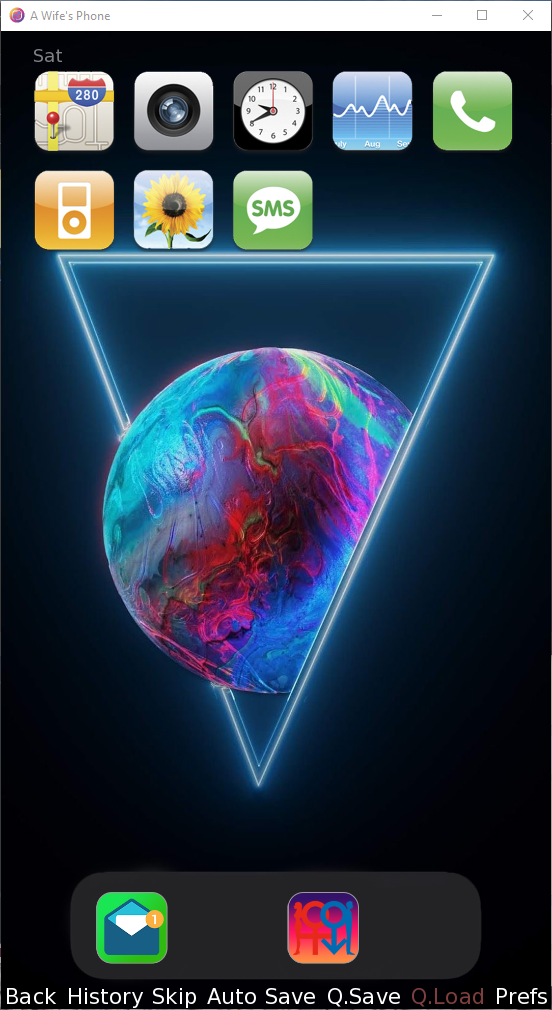 and
and 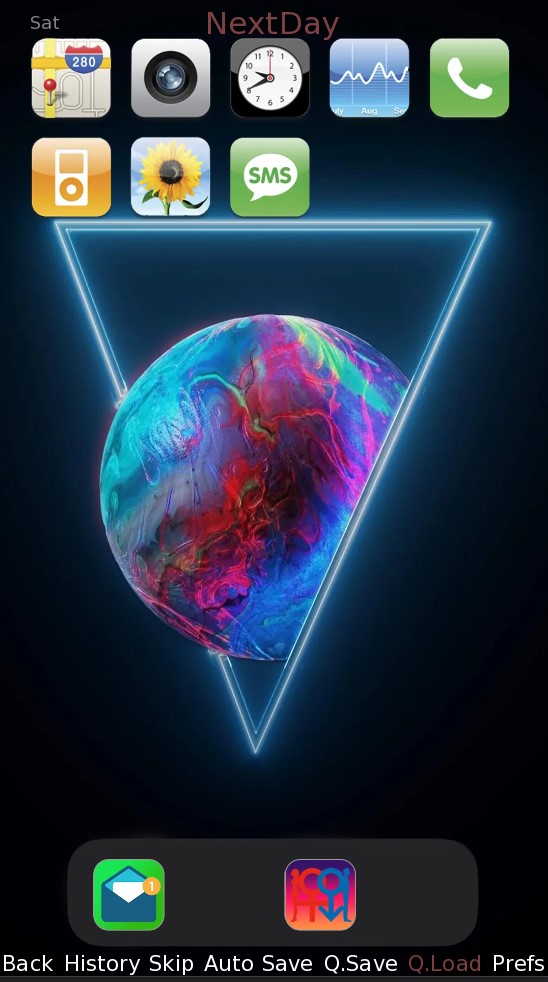 with the ability to skip the current day
edit: added a zip with the files already patched for c0.3.0. Extract and add them inside the "game" folder.
edit2: it is compatible with old saves (since the current_day is already defined as a flag inside the game).
To continue/import an old save and have the day appear on the phone you must open the file "script_0_2.rpy" with a text editor and after the line
label after_load: insert/write
show screen Day_of_WeekThen start the game and load your saved file. The day will appear in the phone screen
• Jenna & Wife route (50 steps, 778–826)
• Kirely route (50 steps, 77–126)
• Hearth route (70 steps, starting at step 74)
• Wife & Coworker storyline (30 steps, 46–75)
• Wife & Work storyline (21 steps, 253–274) — available only if Wife became QOS
• StarTaxi storyline (61 steps, 0–60) — brand new branch for Alpha MC
Total: 282 steps
Minimum
OS: Windows 7+ / macOS 10.10+ / Linux
CPU: Dual Core 1.5 GHz
RAM: 2 GB
GPU: Integrated Graphics
Storage: 8.25 GB
Recommended
OS: Windows 10+ / macOS 12+ / Linux
CPU: Dual Core 2.0 GHz
RAM: 4 GB
GPU: Any dedicated GPU
Storage: 8.25 GB
This game had me on the edge the entire time, literally 😉 I especially loved when Jenna teases you and shares photos with the girls face covered, and she doesn’t outright Say it but its ‘implied’ that it’s your wife, just so fuckin sexy
The game is updated to latest version.
Can’t wait till the next update
I was intrigued, I’m usually not interested in “real pictures” porn games but the pitch of this one caught my attention. I ended up hooked. A bit short for now, I’ll come back when there’s more update but I can recommend !! IF you have the right kinks for this !!
I don’t know what happened in the last update but the game is unplayable now.
The game is fantastic, but I would like to have a walkthrough, because sometimes the game gets confusing.
It’s not available yet.
Ok, thank you.
Wonderful empathy, so perfect, wish to see more soon:)
Adding the rpa files to the game file doesn’t work
For me too. Please fix
If u found the solution please reply me bro
I can not figure out how or which file to move, it asks me to move a provided rpa file to directory documents/renpy_saves/com.bloodyink.awifesphone/game. I downloaded the archive file and hq apk. I can find the specified file folder in the archive. But how do i move it? Where to? I am confused.
I can’t play the latest version of the game. It keeps crashing.
Your download file might be broken try downloading again.
No bro it keeps crashing after pasting rpa file in the folder
Please read the installation and follow those steps.
I can not figure out how or which file to move, it asks me to move a provided rpa file to directory documents/renpy_saves/com.bloodyink.awifesphone/game. I downloaded the archive file and hq apk. I can find the specified file folder in the archive. But how do i move it? Where to? I am confused.
What rap file means. I can’t install on my Android phone.
windows links are broken
The game is updated to latest version.
When new version will come ???
I already played 0.2
It’s not available yet.